
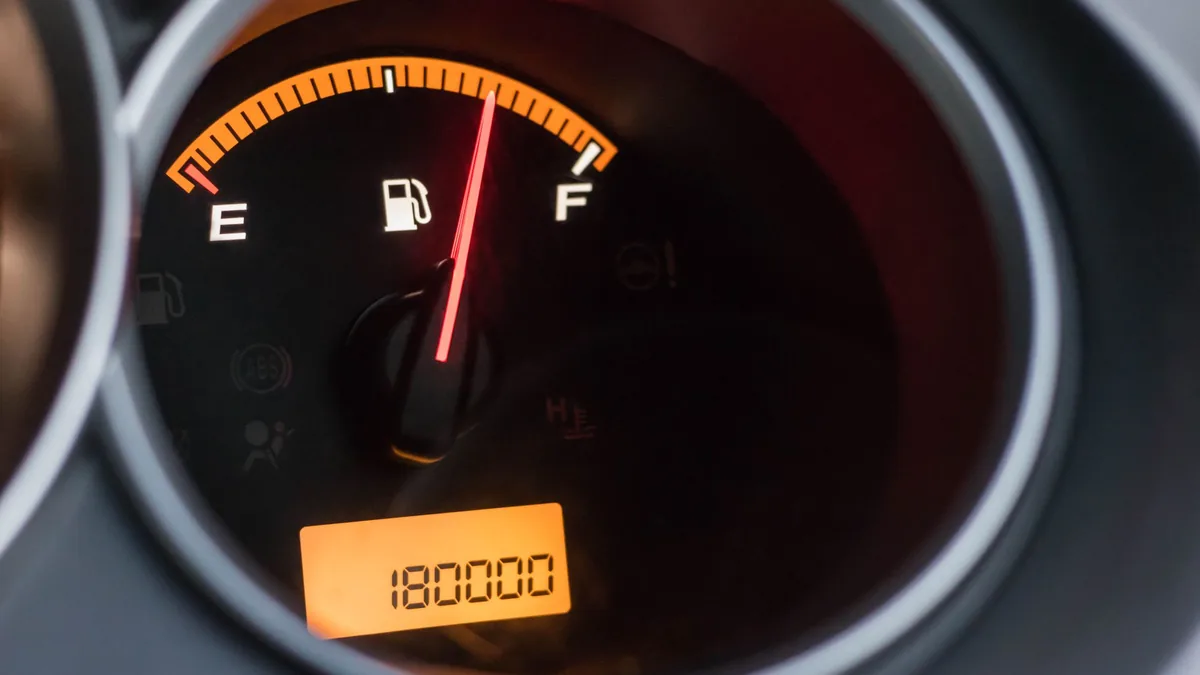
If you are wondering what photos to take when renting a car, the honest answer is fewer "artistic" shots and more boring, systematic ones. Take one unbroken walk-round video first. Then take about twenty stills: each of the four corners, each wheel, the windscreen, the roof, the seats, the boot and spare, and one clear frame of the dashboard with the engine running so the odometer and fuel gauge are both readable. Before you drive off, send the lot to the supplier in the same message thread you used to arrange the hire, and ask them to reply "received". At return, repeat the same shots in the same order. Then keep everything, untouched, until your deposit is back in your account. The rest of this guide covers how to frame each shot so it settles an argument, and how to make sure nobody can say the pictures were taken a day later somewhere else.
Why a camera roll beats a memory
Most rental disagreements are about a scuff, a windscreen chip, a kerbed alloy or a fuel needle that was "definitely on full". Without a record, the person holding the deposit tends to win. Good photos answer three questions a stranger would ask:
- What exactly was the condition? A close-up that shows the mark, plus a wider shot that shows where on the car it is.
- When was this? The picture has to be clearly from the moment of handover, not from the evening after.
- Which car? At least one frame in each set should include the number plate.
Set your phone up before the car arrives
A handover may happen at a house gate, a hotel porch or an airport pickup lane, with an agent who has another delivery waiting. You will not want to be fiddling with settings then. Do this the night before.
- Turn location on for the camera app. Phones can write the time, date and GPS position into each photo's metadata, a standard called Exif. According to the Exif reference on Wikipedia, many phones with a GPS receiver store the location in the photo's header automatically, alongside the date and time it was taken.
- Check the phone's clock. If you have just landed from London or Dubai, confirm the phone has switched to Pakistan time. The camera stamps whatever time the phone is set to, and a photo hours out invites questions.
- Clear some storage. A slow walk-round video in high resolution is large, and running out of space halfway round the car loses the record.
- Clean the lens. Dust and fingerprints turn fine scratches invisible. A quick wipe with a soft cloth helps more than any camera mode.
- Switch off beauty filters and heavy "enhance" modes. You want what the car looks like, not a flattering version of it.
- Charge the phone and bring a torch. Evening handovers are common, and a second light source held at an angle shows scratches far better than the phone's own flash.
If you are handling the booking for parents or relatives who will drive, walk them through these settings on a video call before the day. The same applies to the documents: our guide to self-drive eligibility, deposits and handover questions for overseas bookers covers what suppliers usually ask for, and the UK government's Pakistan safety and security advice says UK drivers need both the 1968 international driving permit and their UK licence with them in the car, and that the permit cannot be bought outside the UK.
Video the rental car before driving: one continuous take
Start with the video, not the stills. A single unbroken recording is hard to argue with, because there are no gaps where the car could have been swapped or a mark added. Stills are for detail; the video is for continuity.
How to shoot it
- Start recording before you reach the car. Begin a few steps away so the whole vehicle and the number plate are in frame.
- Say the basics out loud. "It is Tuesday the 14th, about 4.10 in the afternoon, collecting the white saloon, plate as shown, at the house in Model Town." (That is an example; use your own details.)
- Walk slowly clockwise, at roughly knee-to-chest height. Pause for a second or two on each panel. Crouch at the bumpers and sills, which is where most low damage lives.
- Narrate marks as you find them. "Scratch on the rear left door, about a hand's width." Point to it with a finger so the scale is clear.
- Open a front door and film the cabin, then the dashboard with the engine on, then the boot.
- Only stop recording when you have finished. If you stop by accident, start a new video straight away and say why.
Two habits spoil most walk-round videos: walking too fast, so the paint is a blur, and filming into the sun, so glare hides the scratches. Go slower than feels natural and keep the light behind you or low across the panel.
The shot list: what photos to take when renting a car
Once the video is done, take the stills. They are what you will attach to a message, zoom into, and compare side by side at return. Work in the same order as the video so the two records line up.
| Shot | What to frame | Why it matters |
|---|---|---|
| Four corner shots | Each corner from about two metres, diagonally, so two sides and the plate or light cluster show | Places every later close-up on the car |
| Each side in full | Front to back, straight on | Shows door dents that corners miss |
| Front and rear bumpers, low | Crouch to bumper height | Speed-breaker and kerb scrapes sit on the lower lip |
| Four wheels | Whole wheel, then the rim edge | Kerbed alloys are a classic end-of-hire charge |
| Tyre tread | One shot per tyre, tread visible | Shows the car was not handed to you on worn tyres |
| Windscreen | Straight on, then at an angle with light across it | Small chips show only at an angle |
| Rear and side glass, mirrors | Each mirror housing and glass | Mirror casings get clipped in narrow streets |
| Roof | From a doorsill or step, if safe | Hail marks, scratches from roof racks |
| Seats and carpets | Front row, back row, driver's footwell | Burns, tears and stains are often charged as cleaning |
| Dashboard, engine on | Odometer, fuel gauge and any warning lights in one frame | The two numbers most often disputed |
| Boot and spare | Boot floor lifted, spare tyre, jack and wheel brace | Proves the kit was there before you left |
| Documents | Registration book or card and any supplier handover sheet | Links the car's identity to your pictures |
Framing each mark: wide, then close
For any existing damage, take two photos. The first shows the whole panel so anyone can see where on the car it is. The second is a close-up with something for scale: your finger, a key, a coin. A close-up on its own is nearly useless in a dispute, because it could be any car.
Three shots people skip
- The windscreen at an angle. Tilt the phone so light rakes across the glass; a chip invisible straight on often shows as a bright star.
- The roof. It is out of eye line, which is exactly why it gets disputed. If it is safe, stand on the door sill with the door open and shoot across the roof from each side. Do not climb on the car.
- The rim edge. A photo of the whole wheel misses kerb scrapes. Take one more along the edge of each rim.
If the car smells of smoke at collection, say so in the video. A smell does not photograph.
Photograph odometer and fuel gauge in one frame
This is the single most valuable still in the set, and the one most often taken badly. Two numbers decide a lot of end-of-hire charges: the distance driven and the fuel level. Photograph odometer and fuel gauge together, with the engine running, so the gauges are live and any warning lights are showing.
- Turn the ignition fully on. On many cars the fuel needle only settles once the engine has run for a few seconds. Wait for it.
- Get the odometer, not the trip meter. Some dashboards show a trip figure by default. Press the button until the total distance is showing.
- Shoot straight on, then close. One photo of the whole instrument cluster, one close enough to read the digits without zooming.
- Capture the warning lights. If an engine, tyre-pressure or battery light is on, you want that on record before your first kilometre, not after.
- Write the numbers into your message. "Odometer 48,312, fuel just under three-quarters" (example figures) turns a photo into a statement the supplier can agree with or correct.
If the hire has a distance allowance or a fuel rule, such as returning the car at the same level, these two photos are what your final bill will be checked against. The details belong in your supplier's confirmation, so read that before handover day.
Timestamped photos of rental car damage: proving time and place
A photo is only strong evidence if it is clearly from the handover. There are two layers to that: what the file itself records, and what you do with it straight away.
What the phone records for you
As covered above, many phones store the capture date, time and, with location switched on, the GPS position in each photo's Exif metadata. Google's own help page on photo locations in Google Photos notes that a location added automatically by your camera cannot be updated or removed in Google Photos, while estimated or manually added locations can. Apple's iPhone guide explains how to see a photo's information, including the date and time it was taken.
That is helpful, but metadata is not the whole answer. The Exif article notes that most image editors damage or strip some of this data when they save a file, and the other side may never look at it anyway. Treat metadata as your back-up, not your main proof.
What makes it count: send it the same hour
The strongest step is simple. Before you drive away, or within the hour at the latest, send the photos and video to the supplier in the thread you already use for the booking, and ask for an acknowledgement.
Why this works:
- The message itself carries a sent time that neither side controls.
- The supplier cannot later say they never saw the marks.
- If they disagree with anything, they have to say so now, while the car is still in front of both of you.
Here is an example of a message you could adapt:
"Salaam, handover photos and walk-round video for the car collected today at about 4.10 pm. Existing marks: scratch on rear left door, chip low on windscreen passenger side, scuff on front right alloy. Odometer 48,312, fuel just under three-quarters. Please reply to confirm you have received these."
Keep it short and factual. If the agent is standing there, show them the message before you send it.
Belt and braces
- Also email yourself the originals or upload them to your own cloud storage the same day, so there is a second timestamped copy under your control.
- Do not crop or edit the originals. If you want to highlight a mark, make a copy and edit that.
- Photograph the supplier's own sheet if they give you one, with the marks they have noted.
If the photos show something serious before you leave
Photos are not only for protecting a deposit. Sometimes the walk-round tells you the car should not leave at all. A tyre with visible cord, a cracked windscreen in the driver's line of sight, a warning light that stays on, a missing spare before a long motorway run: raise these before the keys change hands.
- Show the agent the photo rather than describing it. It is quicker and less confrontational.
- Ask what they propose, whether that is a fix, a different car or a later handover.
- Put their answer in the same message thread, so the decision sits next to the evidence.
The FCDO's safety page describes local driving standards as erratic, especially at night, and warns that long cross-country journeys need care. That is one more reason not to accept a car you already have doubts about on a road trip.
At return: the same shots, in the same order
The return set matters as much as the collection set, and it is the one people rush because a flight is waiting. Build fifteen minutes into your plan for it.
- Return in daylight if you can. Your collection photos may have been taken at dusk; matching them in bright light is easier and fairer to both sides.
- Repeat the walk-round video in the same clockwise order, starting with the number plate.
- Take the same stills, especially the four corners, the wheels, the windscreen and the dashboard.
- Photograph the odometer and fuel gauge again, engine running.
- Photograph the interior after you have taken your bags out, so the seats and boot are visible and empty.
- Photograph the keys being handed over, or the place you left them if the supplier asked for a key drop.
- Send the return set to the same thread and ask for a reply confirming the car has been received in that condition.
If nobody is there to inspect the car, as can happen with an early-morning airport return, your return photos and the time you sent them are the only record of how you left it. Take them with extra care.
Keeping the evidence until the deposit clears
The photos are worth nothing if they have been deleted by the time a query arrives. Deposits and end-of-hire checks can take time, and a charge for damage or fuel may surface after you are home.
- Make one album or folder per hire, named with the date and car, and put the collection and return sets side by side inside it.
- Keep the message thread. Do not clear the chat, even if the hire ended well.
- Be careful with "free up space" tools. Google's help page on freeing up space with Google Photos explains that the tool deletes copies from your device once they are backed up. Make sure that back-up actually exists, and that it keeps originals, before you let it run.
- Keep it until the money is back in your account, not just until the supplier says a refund is on its way. Keeping the folder a few months longer costs nothing and covers a charge that is posted late.
Using the photos as rental car damage claim evidence
If a supplier later says the car came back with damage, stay calm and let the record do the talking.
- Ask for specifics in writing: which panel, which mark, and their photos of it.
- Find the matching frames in your collection and return sets. Look for the wide shot first, then the close-up.
- Reply in the same thread with the relevant photos, the time they were sent, and a short factual note: "This scratch is visible in the handover photos sent at 4.18 pm on the 14th" (example).
- Ask them to compare their photo with yours in the same light and angle.
- Keep every message polite and short. An evidence-led reply is harder to dismiss than an angry one.
If you booked through Pakistan Taxi and a question comes up about the hire, the help and journey planning page (planned link) is the place to start, and our booking terms (planned link) are worth reading alongside the supplier's confirmation. For the wider picture of how hire agreements treat vehicle condition, iDrive, the network behind Pakistan Taxi, publishes its terms of hire.
When someone else is collecting the car
Sometimes the person who books is not the person who collects: for example, a son in Birmingham booking for his father in Faisalabad, or a sister in Sharjah arranging a car for a cousin's wedding week. The evidence still has to come from whoever is standing at the car.
Send them this shot list in advance, stay on a video call during the handover if you can so you can prompt them ("now the roof, now the dashboard"), and ask them to forward everything to you as well as to the supplier. Agree who will do the return set, too.
A quick checklist to save on your phone
Screenshot this and keep it handy on handover day.
At collection
- One continuous walk-round video, starting with the number plate
- Four corners, both sides, both bumpers low
- Four wheels and rim edges, four tyre treads
- Windscreen at an angle, all glass, mirrors and lights
- Roof from both sides, if safe
- Seats, carpets, footwells, boot floor, spare, jack and wheel brace
- Dashboard with engine on: odometer, fuel gauge, warning lights
- Registration document and any handover sheet
- Everything sent to the supplier, acknowledgement requested
At return
- Same video, same stills, same order
- Odometer and fuel again
- Empty interior and boot
- Keys handed over or key-drop location
- Return set sent, acknowledgement requested
Afterwards
- One folder per hire, originals untouched
- Message thread kept
- Everything kept until the deposit is back, and ideally a little longer
Planning a self-drive hire
If you are still at the planning stage, our self-drive hire page explains how Pakistan Taxi helps you put a self-drive enquiry to a car-hire supplier. The car, deposit and conditions come from the supplier's own confirmation, so read it carefully and keep it with your photos. When you are ready to share your dates, city and the kind of car you need, you can plan your journey with Pakistan Taxi (planned link) to start the enquiry.